

I click a "Sign into Klout now to view all your notifications" link in an email from Klout. A browser window opens and starts to load a page on the Klout web site. It endlessly continues to load. I can't stop the loading. I can't close the browser tab. I can't close the browser. Nothing stops it.
I finally get it to close by killing the process -- which has gobbled up over a gigabyte of memory -- in Task Manager. I restart the browser, and the infinite redirection resumes.
Showing posts with label Browser. Show all posts
Showing posts with label Browser. Show all posts
20110911
Problem ID: 6271944292598322682
Entered by: Ben Simo
Entered by: Ben Simo
I gave @Klout +K about Infinite Loops on @Klout.
 Comment
20110904
Problem ID: 7290002624299969504
Entered by: Ben Simo
Entered by: Ben Simo
Cookies
@mojoguzzi tweets: I so want to love your iPhone app, @Marriott, but stuff like this blows. Cookies error? They ARE enabled!

Which error condition is it, Marriott?
Keywords:
20 minutes,
activity,
Browser,
connectivity,
cookies,
disabled,
has been,
Lost,
Marriott,
minutes,
no activity,
Server,
timeout
20110820
Problem ID: 3586082296446464313
Entered by: Ben Simo
Entered by: Ben Simo
Sorry, you may not install other browsers
I have a new computer. One of the first things I do once I get it set up enough to connect to the Internet, is attempt to install a browser other than Internet Explorer.
I start with Chrome.

That's not good. The installer failed. I try again and get the same error. However, on the second attempt it doesn't show me the Chrome terms of use. I click the "Show me help for this issue." link.

Cool! Google has no information about the error.
However, Internet Explorer reports an error viewing this web page telling me there is no information on the error.

Nice. Null is null. Anyway, I'm getting distracted. So I go try another browser.
This time I try Firefox.

That doesn't work either.
To make a long story short, I discovered that I had to turn Internet Explorer's "Protected Mode" off and restart the browser. Even then, I could download and install Firefox but not Chrome. I then had to download Chrome using Firefox instead of Internet Explorer.
Does "Protection Mode" refer to protecting me from all browsers that aren't from Microsoft? ;)
20110421
Problem ID: 3154531677185789608
Entered by: Ben Simo
Entered by: Ben Simo
No data is ever transferred to our server
How can Twipho.net search Twitter for images without transferring data to their server? It appears they may be able to do that; however, the browser still transfers data to their server.
In spying on the network traffic, it does appear that the client (the browser) sends requests directly to to Twitter's search API, and client-side Javascript processes the results. However, any entered search terms are also sent to http://www.twipho.net/search.php, which returns a 404 (Not found) error.

20110406
Problem ID: 6873857939047406128
Entered by: Ben Simo
Entered by: Ben Simo
On the Bleeding Edge of Technology


To file an Arizona state tax return online, you can use Internet Explorer 6 or Firefox 1, but not Chrome.
20100311
Problem ID: 3122612143399013167
Entered by: Ben Simo
Entered by: Ben Simo
Sign in again too soon
I get the following in response to logging into the HP software support site.

I last signed in about 24 hours ago. Is signing in the next day too soon? If so, how long should I wait?
Or is this trying to tell me that a browser cookie issue may be forcing me to sign in again too soon?
This is a fairly useless error message. I refreshed the page and my post sign-in destination page is displayed.
20100220
Problem ID: 7312438796002087727
Entered by: Ben Simo
Entered by: Ben Simo
You can't use navigation on this site
I enter my correct user ID and password and then click the Log On button. I get an error dialog.

What is invalid? Do I enter only one value or both the username and password? That message number means nothing to me. My valid credentials contain characters that are not alphanumeric.
I click OK and start to retype my user ID.

My user ID is unexpectedly masked.
After a few attempts, the same credentials that repeatedly failed to get me access to the system worked. I viewed a couple pages and then clicked the back button.

I understand that some web applications don't support the use of browser back buttons, but is no browser navigation allowed?
Apparently my login issues must have been due to my attempting to use a browser to navigate into the application. ;)
If navigation via a browser doesn't work on the site, how is anyone to use it? Telekinesis?
20100118
Problem ID: 1413432103369642160
Entered by: Ben Simo
Entered by: Ben Simo
Chrome can't open HTML files?
"I must be hitting the pipe again, Chrome can't open an html file from my computer?" - theflashbum

“hmm, blöd. #html-files #fail #chrome” - @flachsi
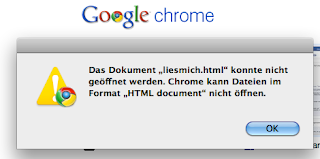
After having seen well over a dozen images tweeted like the ones above, and finding it bizarre that Chrome doesn't open HTML files, I gave it a try myself. So far, Chrome has opened the HTML files I have tried to open from my local hard drive. I've opened files by dragging and dropping them onto Chrome. I've opened them by right-clicking and opening with Chrome. I've entered "file://" URLs into the address/search field.
So, either my Chrome has a patch others don't or there's something more to the specific condition under which Chrome doesn't open HTML files.
And if it is specific HTML content that's not supported, an error message blaming the "HTML Document" format is misleading.
20100115
Problem ID: 6995159082524398972
Entered by: Ben Simo
Entered by: Ben Simo
A modern web browser

According to blip.fm, the Internet Explorer packaged with Windows Mobile 5.2 (Released in 2007) is not a modern web browser. I think they may be right.
Thanks for the warning that things could get wacky.

I wish I could put any of the recommended browsers on this device.

Okay, things got wacky. The site doesn't work in this browser.
Keywords:
Blip.FM,
Browser,
Choose,
Compatability,
Internet Explorer,
outdated,
wacky,
Windows Mobile
20100110
Problem ID: 897215949111822126
Entered by: Ben Simo
Entered by: Ben Simo
So I Married An Axe Murderer
I open up a web browser and go to Hulu.com in search of a movie to watch. The Hulu home page shows an advertisement for the movie So I Married An Axe Murderer. I click the watch now button.

The Hulu page for the movie opens, then it shows me two commercials. Then I get this: Sorry the video is currently unavailable. ...

If the video is not available, why is it still being promoted on the Hulu front page?
This message gives conflicting information. Is the video unavailable or do I have a possible browser issue?
The video starts to play after my third refresh. I click the button to view the movie player in a window without the surrounding header and advertisements. I get the above error again.
It takes a few more refresh attempts to get the movie to start.
Keywords:
Apologize,
Appears,
Browser,
Cache,
Clear,
Currently Unavailable,
Hulu,
inconvenience,
Message,
Movie,
Need,
Repeatedly,
Restart,
Sorry,
Unavailable,
Video,
video is currently unavailable,
Watch
20100101
Problem ID: 2168971157541836151
Entered by: Ben Simo
Entered by: Ben Simo
You're using a browser that's not fully supported
“major #microsoft #fail. why am I not surprised at all?” - @sean808080
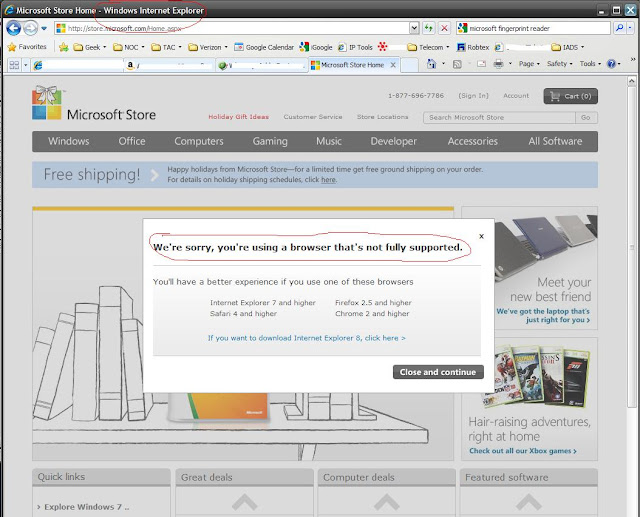
Really!? The Microsoft store does not support Internet Explorer?
Keywords:
Browser,
fully,
Internet Explorer,
Microsoft,
Microsoft Store,
supported,
using,
We're Sorry,
Windows
20091224
Problem ID: 1841756745839193904
Entered by: Ben Simo
Entered by: Ben Simo
Unspecified

The error isn't the only thing unspecified. The error reporting seems a bit unspecific too.
What does a specified error look like? ;-)
Keywords:
another,
Browser,
Error,
instance,
Occurred,
open,
processing,
refresh,
request,
try,
unspecified,
while
20090617
Problem ID: 3629989844290161074
Entered by: Ben Simo
Entered by: Ben Simo
What do you want me to do?

I got this error trying to sign into a web site. I had last signed into the web site about 17 hours prior to getting this error message. What is this message telling me?
Is it saying that I signed in too soon? If so, how much longer than 17 hours do I have to wait?
Is it saying that my browser can have cookie issues that are capable of forcing me to do things too soon?
Is it saying my browser is doing things on its own because of cookie issues?
Or maybe this message is telling me what to do.
Is it saying that I should sign in again too soon? If so, how soon is too soon. And if it is too soon, why should I do it?
Seriously, I doubt this message is at all related to the actual problem. The message makes no sense. This is the kind of message that makes we wonder why some coder spent time entering the error message text into a computer.
And now I'm cringing at the thought that I may have -- sometime in the distant past -- written error messages that are just as confusing.
Pressing the back button and resubmitting the login resulted in the same error. However, I then closed the browser tab and re-clicked the link that led me to login to the site. This time I was not prompted to login. I was sent directly to the destination page that requires user authentication.
It appears my browser had the appropriate session cookies.
 3 Comments
20090407
Problem ID: 4436397726595176996
Entered by: Zachary Fisher
Entered by: Zachary Fisher
Pandora's Box needs to be closed; Please re-open
Listening to tunes on Pandora while posting a blog. Hey! That song is nice! I want more like that! Let me measure my acceptance by clicking on the thumbs-up icon I've used every other time. And the song's still playing...perfect. I have time to vote on it while it is active. Here we go...um...wait. What's this:

Okay. So did my vote count? Did you get it, Pandora? Am I going to suffer the aural-warblings of some emo kids before I get to the songs that I like? And why is my copy out of date? I didn't do anything except let it play it the background. And on top of it, I recall hearing some songs I really liked 3 songs back. Will I be able to the see my play history after I take your prescribed advice to reload?

Nope. Great. Now that indie-artist, the one who REALLY needs the money in this economy, has just lost a potential sale. But at least MY Pandora is up to date. I'll take respite in Allison Krauss and Union Station ( whose music I really do like ).
20090225
Problem ID: 7214784627644632149
Entered by: Zachary Fisher
Entered by: Zachary Fisher





