

"I must be hitting the pipe again, Chrome can't open an html file from my computer?" - theflashbum

“hmm, blöd. #html-files #fail #chrome” - @flachsi
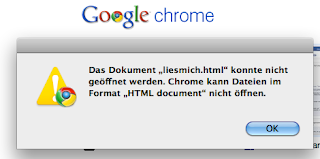
After having seen well over a dozen images tweeted like the ones above, and finding it bizarre that Chrome doesn't open HTML files, I gave it a try myself. So far, Chrome has opened the HTML files I have tried to open from my local hard drive. I've opened files by dragging and dropping them onto Chrome. I've opened them by right-clicking and opening with Chrome. I've entered "file://" URLs into the address/search field.
So, either my Chrome has a patch others don't or there's something more to the specific condition under which Chrome doesn't open HTML files.
And if it is specific HTML content that's not supported, an error message blaming the "HTML Document" format is misleading.
 Comment





