

In Internet Explorer, Bing is suggesting URLs of files on other people's local computers. Perhaps local files shouldn't be used to create URL suggestions made to others. Perhaps.

Is there a problem here?
I have a new computer. One of the first things I do once I get it set up enough to connect to the Internet, is attempt to install a browser other than Internet Explorer.
I start with Chrome.

That's not good. The installer failed. I try again and get the same error. However, on the second attempt it doesn't show me the Chrome terms of use. I click the "Show me help for this issue." link.

Cool! Google has no information about the error.
However, Internet Explorer reports an error viewing this web page telling me there is no information on the error.

Nice. Null is null. Anyway, I'm getting distracted. So I go try another browser.
This time I try Firefox.

That doesn't work either.
To make a long story short, I discovered that I had to turn Internet Explorer's "Protected Mode" off and restart the browser. Even then, I could download and install Firefox but not Chrome. I then had to download Chrome using Firefox instead of Internet Explorer.
Does "Protection Mode" refer to protecting me from all browsers that aren't from Microsoft? ;)


"So, for some strange reason, I find this error really funny. Any idea why? #microsoft" - @CajunTechie

Submitted by Rafat Fatima.

And what does this mean to a user of Yahoo! Mail?


There seems to be a problem with mobile GMail. I don't know what 0x8007054f means but it doesn't seem to be a good thing. I can't get to my email. Windows Mobile won't let me select and copy text from a dialog. I'm going to have to try to remember this number in order to search for the error code.
A Google search for the code reveals a bunch of results about errors installing Windows XP updates. No help there. I'll have to wait and read email when I can get to a computer.

I am still getting the error 10 hours later.

Some times I get the above instead of the error 0x8007054f dialog. I can access other web sites, so I don't think it is a problem with my wireless carrier.

Googling for Gmail and clicking a link in the results gives the same error.

I try a different browser. SkyFire can access the full-featured Gmail.

However, continually zooming and panning to read and write email on the tiny phone screen is going to be cumbersome.
I want my mobile Gmail back.

I want to view a blog post, not remove a handler.
aravindajith - Most ridiculous error of the decade!
portfolia - @aravindajith That drives me absolutely crazy.
gosquared - Oh dear. This error makes me feel sick
krizsa - Wow..

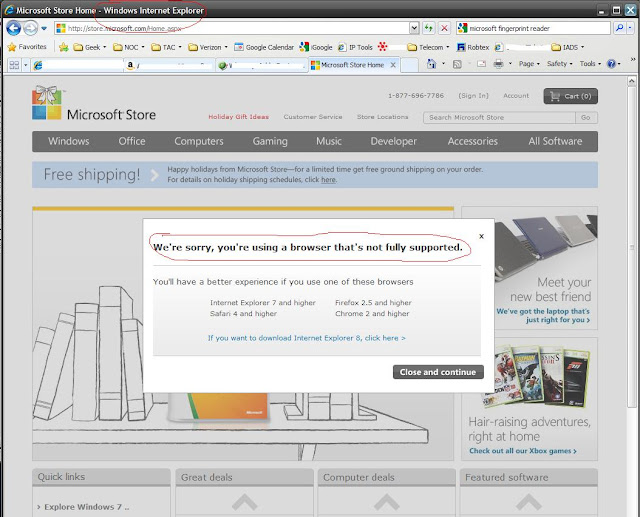
I don't believe warning users that a site may not be compatible with their browser is ridiculous -- if it actually isn't compatible. However, I don't think that's the case here.
I tried this site with IE7, Firefox 3.5, and Chrome. I got no warning dialog with IE7. I got two of them with Firefox. And with Chrome, I got one warning dialog.
I then explored the site and found nothing that failed to work with Chrome or Firefox.
A quick look at the page source reveals checks for browser names of WebTV and Navigator that trigger error dialogs. I thought that, perhaps, this check for WebTV and Navigator is code that's been on the site for a very long time. So I took a look at the WayBack Machine and discovered that the code was likely added around January 2007. Perhaps a lot of people use WebTV in Aggieland.

According to blip.fm, the Internet Explorer packaged with Windows Mobile 5.2 (Released in 2007) is not a modern web browser. I think they may be right.
Thanks for the warning that things could get wacky.

I wish I could put any of the recommended browsers on this device.

Okay, things got wacky. The site doesn't work in this browser.
@scottpatton: an IE script error on an atm? tha makes me feel "safe". NOT!!!!!!

Tweeted by ersonline.

Internet Explorer on the price check scanner reports that the server can't be found. I'd expect a better customized error page for an embedded device like this. Perhaps it was assumed that the scanner would always have a good connection to the server.
I bet the cash registers will have no trouble getting the price. Or is everything free while the server can't be reached.
Alan Simkins reports:
Attempting to add a search provider (Google) to the list, using their standard page gives an ‘error on page’ error. However, there is a facility to add your own providers to the list.
Using this facility evokes the following error message:

Nice to know, but what’s the point??

I have a new computer. As happens during the first few weeks with a new computer, I find myself spending a lot of time installing and updating software. This includes many automatic updates by Windows and other software packages that keep the system busy downloading and installing all the patches that have been released since whenever the maker of the computer created the disk image. Many of these automatic updates require that I restart the computer.
One of the latest restarts was due to upgrading Internet Explorer from version 7 to version 8. On reboot, the system launches IE8 and leads me through several configuration options. Eventually it takes me to the browser and displays a Welcome to IE8 page.

Most of my display is consumed by a picture that links to a video introducing Internet Explorer 8. Although IE is not my primary browser choice, I am interested in how it differs from IE7. I click the video image. Media Player launches.
As I watch the loading progress indicator in Media Player grow, I'm thinking it odd that the video didn't play embedded in the web page.
Then an error dialog appears.

It appears that my computer doesn't have the required video codec for Microsoft's IE8 introduction video.
I think "Why isn't this packaged with IE8 or Windows? Is Microsoft not using a standard codec for their videos?"
I then start thinking of my last experience with missing video codecs: an experience that led me down some shady alleys of the Internet that resulted in getting a computer infected with all kinds of Trojan crap that still effects that computer. Even removing the crap with virus and spyware programs didn't fix it. I even ended up paying $50 for codecs from a legit company and still can't play most WMV videos on that system. I don't dare go down that path again.
I reluctantly follow the instructions and click the Web Help button. This takes me to a Microsoft Windows Media help page about the error.

At the bottom of the help page, there's a link to a web site at which I'm told I may be able to find a codec to download. I click it.

I then get a page stating that Microsoft has retired the web site to which their software sent me to find the codec I need to view their video that introduces Internet Explorer 8.
So, now more intrigued by what it will take to get the video to play than any interest in the video, I do a Google search for the missing codec.


I upload an image to Blogger from Picasa using the BlogThis! button. Picasa launches Internet Explorer so that I can write/edit a blog post using the image. However, the page doesn't display properly. Tabs are missing, buttons don't work, and the edit box isn't formatted properly. Edits aren't saved when I click the Save button. This used to work with Internet Explorer 7.
Firefox, my preferred browser, seems to work just fine.


Who in their right mind expects anyone to read, understand, and accept 78 mobile device screens full of legalese to install a Windows Mobile application? (Yeah, I counted 78.)
If reading an agreement is made so difficult that most people will be discouraged people from doing it, will it hold up in court?

I just clicked the PUBLISH POST button. I expect others to be able to see the information.

 1 Comment





