If I am not logged in, what was that whole login procedure you took me through before writing my comment?
Hotel Internet, oh how I love thee. Let me count the ways.
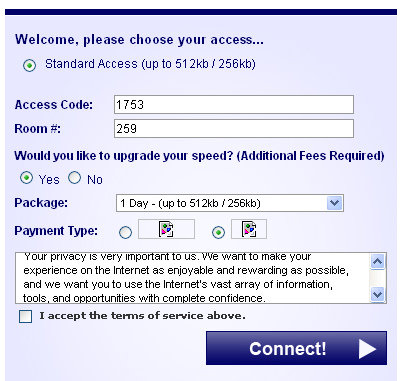
1) I love that you give me the option to choose between standard access and ... well nothing.
2) I love that you require I get an access code from the front desk. I wanted to talk to the desk clerk again. Now, what was my room number?
3) I love that you give me the option to upgrade to faster standard access... for an undisclosed additional fee.
4) I love that you require I read a long legal document through a tiny window, 3.9 lines at a time.

5) I love that using free Internet requires I make a $0 purchase via PayPal.

6) I love that once I purchase my free Internet, you give me another opportunity to enter the access code and room number... Plus, I jump at another opportunity to read the terms of service through a tiny window pane.

7) I love your helpful error messages and the lack of Internet access after I've performed so many tricks for you.
8) And most of all, I love that I have to call your wonderful technical support people and explain all that I've already done for you... and then do it again while they listen to me gripe about it on the phone.
Now, I just wish I could remember what it was I wanted to do on the Internet.

NTI Shadow is a backup program advertised to automatically backup data to a NAS file server as files are changed.
However, it appears that the designers of the software failed to seriously consider that one may be using a mobile computer that does not always have access to the network file server. I don't think I should have to manually restart backup jobs every time I connect and disconnect from the network.
Getting this error while saving a new file in Excel 2010. Directory has "[]".
@Office I am able to create New Excel file in the same directory from Win Explorer (Right click-New-Excel)
@Office Using Word 2010, when I save a file in same directory, I do not get such problem. #Office2010


 Comment