


I think this spent more time calculating the time required to upload my files than it spent uploading my files.
It is often better to stop estimating and start doing.
Showing posts with label files. Show all posts
Showing posts with label files. Show all posts
20110910
Problem ID: 8560843921176535320
Entered by: Ben Simo
Entered by: Ben Simo
Estimation
 2 Comment
20110329
Problem ID: 8330838200266608631
Entered by: Ben Simo
Entered by: Ben Simo
Who is asking?

So, you've detected that I am simultaneously accessing a file with more than one application. You've detected that the file has been "changed by another application". I appreciate being asked if I want to reload the file after it has been changed in another application. However, I have one question.
Which application are you? You've failed to identify who you are. Perhaps you have the version of the file that I want to keep. If you are going to ask me if you should reload a file (and potentially lose any changes you may have in memory), please identify yourself.
 1 Comment
20100118
Problem ID: 1413432103369642160
Entered by: Ben Simo
Entered by: Ben Simo
Chrome can't open HTML files?
"I must be hitting the pipe again, Chrome can't open an html file from my computer?" - theflashbum

“hmm, blöd. #html-files #fail #chrome” - @flachsi
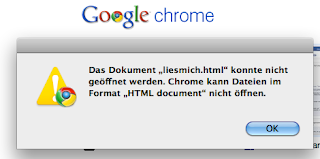
After having seen well over a dozen images tweeted like the ones above, and finding it bizarre that Chrome doesn't open HTML files, I gave it a try myself. So far, Chrome has opened the HTML files I have tried to open from my local hard drive. I've opened files by dragging and dropping them onto Chrome. I've opened them by right-clicking and opening with Chrome. I've entered "file://" URLs into the address/search field.
So, either my Chrome has a patch others don't or there's something more to the specific condition under which Chrome doesn't open HTML files.
And if it is specific HTML content that's not supported, an error message blaming the "HTML Document" format is misleading.
20100108
Problem ID: 3266019754425407076
Entered by: Ben Simo
Entered by: Ben Simo
Help Microsoft?

Might it violate licensing and privacy agreements for Windows to send files to Microsoft?
Keywords:
Cancel,
checkbox,
Clear,
Defender,
Effectiveness,
File,
files,
Help,
Microsoft,
next,
program,
Send,
Sending,
Windows,
Windows Defender
Problem ID: 8987970906880734407
Entered by: Ben Simo
Entered by: Ben Simo
Files in Use

I tell the CLUpdater program that it can install a patch and it tells me I have to close the CLUpdater program.
Are users expected to use task manager to install an update? Why do I have to manually kill the process that started the install that demands I kill the process that started the install process?
Keywords:
Application,
Click,
Close,
Continue,
CyberLink,
Exit,
files,
Ignore,
in use,
Install,
Patch,
Retry,
setup,
updated,
YouCam
20100105
Problem ID: 4112511609409210929
Entered by: Ben Simo
Entered by: Ben Simo
The files could not be found and will not be loaded
"Most informative Visual Studio error ever." - tillig

Problem ID: 6799067861311870598
Entered by: Ben Simo
Entered by: Ben Simo
You can't directly upgrade from Windows XP to Windows 7
Tweeted by realestatezebra:
This may be the stupidest error message I've ever gotten.

Is it unreasonable for people to expect to be able to upgrade from Windows XP to Windows 7?
Keywords:
Compatability,
directly,
Easy,
files,
Install,
keep,
Microsoft,
report,
Settings,
Transfer,
upgrade,
Windows,
Windows 7,
Windows XP,
you can't
20091230
Problem ID: 6663232021982518323
Entered by: Ben Simo
Entered by: Ben Simo

Keywords:
Before,
computer,
contents,
Disk,
downloading,
files,
increase,
Issue,
Maximum,
remove,
space
20091228
Problem ID: 2600191017826962593
Entered by: Ben Simo
Entered by: Ben Simo
No to All?

Every version of Microsoft Windows I can remember displays a message similar to the above when copying or moving files and it finds duplicate files or folders in the destination path.
When copying dozens (or hundreds, or thousands) of files, checking this message and clicking Yes for each item can take hours (or days). Selecting Yes to All can be useful when it is known to be safe to overwrite files in the destination folder. However, sometimes a warning would be helpful.
So where is my No to All button with reporting/logging of what didn't get copied/moved?
20090215
Problem ID: 8570472471778434016
Entered by: Ben Simo
Entered by: Ben Simo
Would you like to completely erase all files?

All of what files? More context please.
Keywords:
all files,
completely,
completely erase,
erase,
files,
installation,
No,
remove,
select,
Uninstall,
upgrading,
user-generated,
Warning,
Would you like,
Yes





